Toyota Corolla Cross: System Diagram
SYSTEM DIAGRAM
SMART KEY SYSTEM (for Start Function)
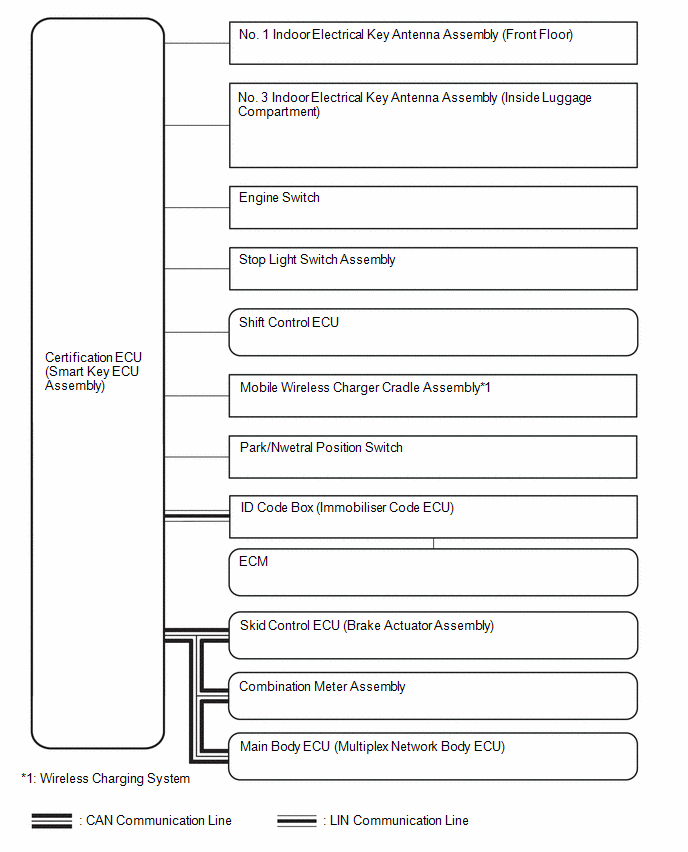
SMART KEY SYSTEM (for Entry Function)
Click here .gif)
READ NEXT:
CAUTION / NOTICE / HINT
NOTICE:
Do not perform "Smart Code Reset" (all key ID erasure) until all malfunctions and symptoms have been confirmed and resolved. If all key ID erasure is performed wi
CUSTOMER PROBLEM ANALYSIS CHECK
HINT: Be sure to ask the customer in detail about the following points concerning the vehicle operating conditions, environment and problem, and then check for DT
CHECK FOR INTERMITTENT PROBLEMS
NOTICE:
Operation history is stored in the RAM or EEPROM of the certification ECU (smart key ECU assembly). As the cause of a malfunction stored in the RAM will b
SEE MORE:
DIAGNOSTIC TROUBLE CODE CHART
Intuitive Parking Assist System
DTC No.
Detection Item
Link
C161504
Clearance Warning ECU System Internal Failure
C1AE187
Ultrasonic Sensor (Front Left Corner) Missin
DESCRIPTION
The skid control ECU (brake actuator assembly) receives stop
light switch assembly signals and uses them to determine whether or not the brakes
are applied.
The skid control ECU (brake actuator assembly) has a detection
circuit that it uses to detect an open in the stop light inp

 How To Proceed With Troubleshooting
 Diagnostic Trouble Code Chart
