Toyota Corolla Cross: System Diagram
SYSTEM DIAGRAM
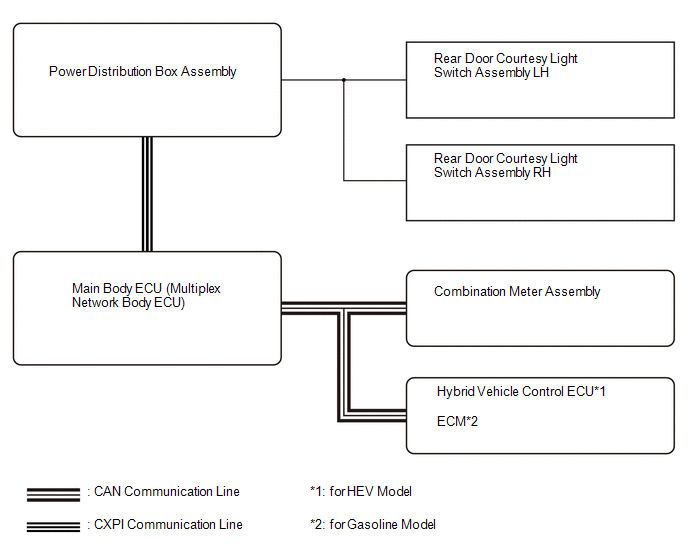
READ NEXT:
CAUTION / NOTICE / HINT
HINT:
Use the following procedure to troubleshoot the rear seat reminder system.
*: Use the GTS.
PROCEDURE
1. VEHICLE BROUGHT TO WORKSHOP
OPERATION CHECK CHECK BASIC OPERATIONS NOTICE:
Using the multi-information display (combination meter assembly), check that the rear seat reminder function is set to ON.
Click here
HINT:
U
CUSTOMIZE PARAMETERS CUSTOMIZE REAR SEAT REMINDER SYSTEM
NOTICE:
When the customer requests a change in a function, first make sure that the function can be customized.
Record the current s
SEE MORE:
DESCRIPTION
DTC No. Detection Item
DTC Detection Condition Trouble Area
Warning Indicate Test Mode / Check Mode
B00041A Driver Knee Bolster Deployment Control Circuit Resistance Below Threshold
One of the following conditions is met:
The airbag ECU asse
DTC SUMMARY MALFUNCTION DESCRIPTION This DTC is stored when an abnormal current sensor output signal is detected. The cause of this malfunction may be one of the following: Internal inverter malfunction
Current sensor malfunction
Inverter with converter assembly internal circuit malfunct

 How To Proceed With Troubleshooting
 Driver Knee Bolster Deployment Control Circuit Resistance Below Threshold (B00041A)
