Toyota Corolla Cross Owners & Service Manuals

Toyota Corolla Cross: Check Mode Procedure

CHECK MODE PROCEDURE

HINT:

Compared to normal mode, check mode is more sensitive to malfunctions. Therefore, check mode can detect malfunctions that cannot be detected in normal mode.

NOTICE:

All the stored DTCs and freeze frame data are cleared if: 1) the engine stop and start ECU is switched from normal mode to check mode or vice versa; or 2) the ignition switch is turned from ON to ACC or off while in check mode. Before changing modes, always check for and note any DTCs and freeze frame data.

CHECK MODE PROCEDURE

(a) Check and ensure the following conditions:

(1) Auxiliary battery voltage is 11 V or higher.

(2) Shift lever is in P or N.

(3) A/C switch is off.

(b) Enter the following menus.

Powertrain > Stop and Start > Utility

Tester Display

Check Mode

(c) Switch the engine stop and start ECU from normal mode to check mode.

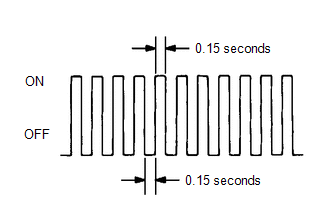
(d) Check that the stop and start indicator flashes as shown in the illustration.
(e) Start the engine.

(f) Check that the stop and start indicator turns off.

(g) Simulate the conditions of the malfunction described by the customer.

(h) Check for DTCs and freeze frame data using the GTS.

    READ NEXT:

     Fail-safe Chart

    FAIL-SAFE CHART If any of the following DTCs are stored, the engine stop and start ECU enters fail-safe mode to preserve vehicle operability. DTC Component Fail-safe Operation Fail-safe

     Data List / Active Test

    DATA LIST / ACTIVE TEST DATA LIST HINT: Using the GTS to read the Data List allows the values or states of switches, sensors, actuators and other items to be read without removing any parts. This no

     Diagnostic Trouble Code Chart

    DIAGNOSTIC TROUBLE CODE CHART Stop and Start System DTC No. Detection Item MIL Warning Indicate Note Link P033562 Crankshaft Position Sensor "A" Signal Compare Failure

    SEE MORE:

     Inspection Mode Procedure

    INSPECTION MODE PROCEDURE INSPECTION MODE (a) for Gasoline Model, Diesel Model, LPG Model: The following table shows the types of inspection mode that are available, their purpose and the control that occurs in mode. Utility Items Main Purpose Control

     Driver Side Door Entry Lock Function does not Operate

    DESCRIPTION If the entry lock function does not operate for the driver door only, but the entry unlock function operates, the request code is being transmitted properly from the driver door. In this case, there may be a problem related to the lock sensor (connection between the certification ECU (sm

    © 2020-2026 Copyright www.tcorollacross.com PT NL